

Have you been searching for the different ways to buy EFootball coins in Nigeria? If you are nodding your head right now, well, this blog post is for you.
If you play eFootball in Nigeria, you already know the struggle. You open the game, see a player you want to sign, and then you hit the same wall every time. Your Nigerian debit card gets declined. Your bank blocks the transaction. Or the in game store does not even show Naira as an option.
That is where Codashop comes in. It is the official web store for eFootball coins, and it accepts OPay. No card declines. No dollar conversion headaches. Just Naira from your OPay wallet straight into your game account.
I have done this multiple times. This guide walks you through every single step. No skipped details. No assumptions. Just exactly what to do.
What You Need Before You Buy EFootball coins Using OPay
Do not skip this part. If you get any of these wrong, your coins will not arrive or they will go to the wrong account.
A KONAMI ID linked to your eFootball game. This is not optional. Your coins get sent to your KONAMI ID, not your PlayStation or Xbox account. If you have been playing as a guest, you need to create a KONAMI ID and link it first.
An OPay account with enough balance. You need the OPay app installed and verified. Make sure you have funded your wallet with the amount you want to spend, plus a little extra for any small fees.
A stable internet connection. The payment process is quick, but if your connection drops during the transaction, you might lose your money or your order might get stuck.
Your KONAMI ID login details. You will need your email and password during checkout. Have them ready.
1: Create or Link Your KONAMI ID
If you already have a KONAMI ID linked to your eFootball save, skip this. If not, here is how to do it.
- Open the eFootball app on your phone.
- Go to the main menu and look for “Support” or “Data Transfer.”
- Select “Link with KONAMI ID.”
- Enter your email and create a password.
- Verify your email through the link KONAMI sends you.
- Return to the game and confirm the link is active.
Do this before buying coins. If your game is not linked to a KONAMI ID, the coins have nowhere to go. You will waste money. You can follow this official Konami documentation on how to Link Your ID
2: Fund Your OPay Wallet
You need Naira in your OPay wallet before you can pay on Codashop. Here is how to add money.
- Open the OPay app.
- Tap “Add Money” on the home screen.
- Choose your preferred method:
- Bank Transfer: Copy your OPay account number and transfer from any Nigerian bank app.
- Card Funding: Link your Nigerian debit card and top up directly.
- Agent Deposit: Visit any OPay agent and deposit cash.
- USSD: Dial the USSD code provided in the app from any phone.
- Enter the amount you want to add.
- Confirm the transaction.
Your balance updates instantly for most methods. Bank transfers might take a minute or two.
3: Visit the Official eFootball Codashop Store for Nigeria
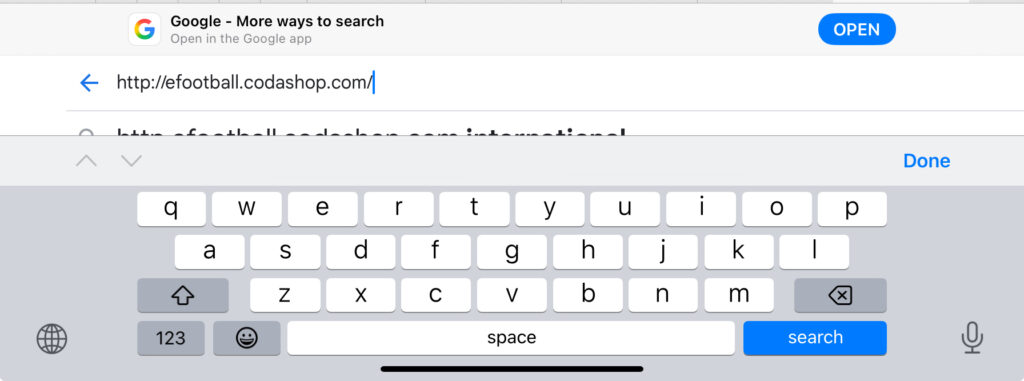
Do not search random links. Use the official store. The Nigeria specific Codashop page for eFootball accepts OPay directly. Just visit https://efootball.codashop.com
- Open your phone browser. Chrome or Safari works fine.
- Go to the eFootball Codashop Nigeria page. The URL should show the Nigerian region.
- You will see a clean page with coin packages and prices in Naira.
The Nigeria store is built specifically for us. It shows local prices, local payment methods, and it processes in Naira. No dollar conversion. No hidden fees.
4: Sign In to Your KONAMI Account
Before you pick any coins, you need to log in. This tells Codashop where to send your purchase.
- On the Codashop page, look for the “Sign In” button.
- Enter your KONAMI ID email and password.
- Click sign in.
You should see your username or profile name appear on the page. This confirms the system knows who you are. If the login fails, double check your password. If you forgot it, reset it on the KONAMI website first. Do not guess.
5: Choose Your Coin Package
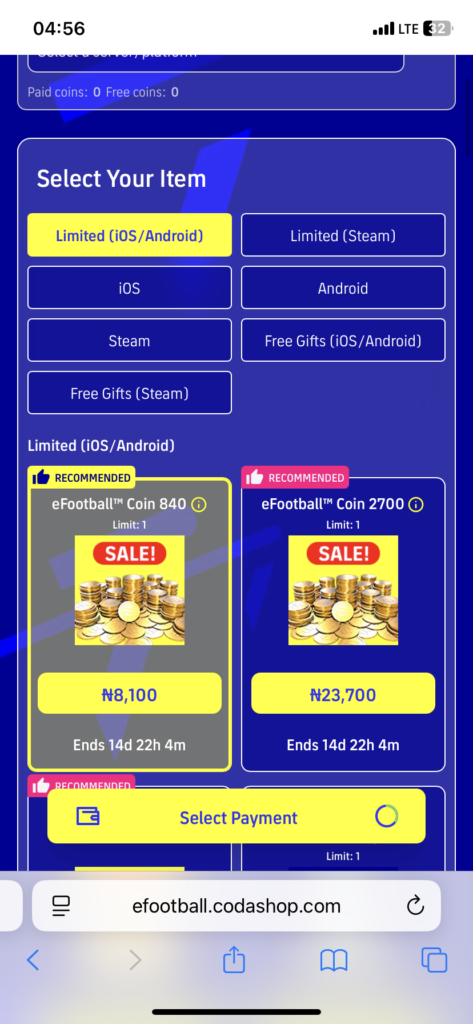
Now you pick how many coins you want. The Nigeria store shows packages like these:
- 100 eFootball Coins
- 310 eFootball Coins
- 770 eFootball Coins
- 1,570 eFootball Coins
- 3,300 eFootball Coins
- 7,700 eFootball Coins
Each package has a Naira price listed right next to it. The bigger the package, the better the value per coin. But do not overspend just because the deal looks good. Buy what you actually need.
Tap the package you want. The page will highlight your selection.
6: Select OPay as Your Payment Method
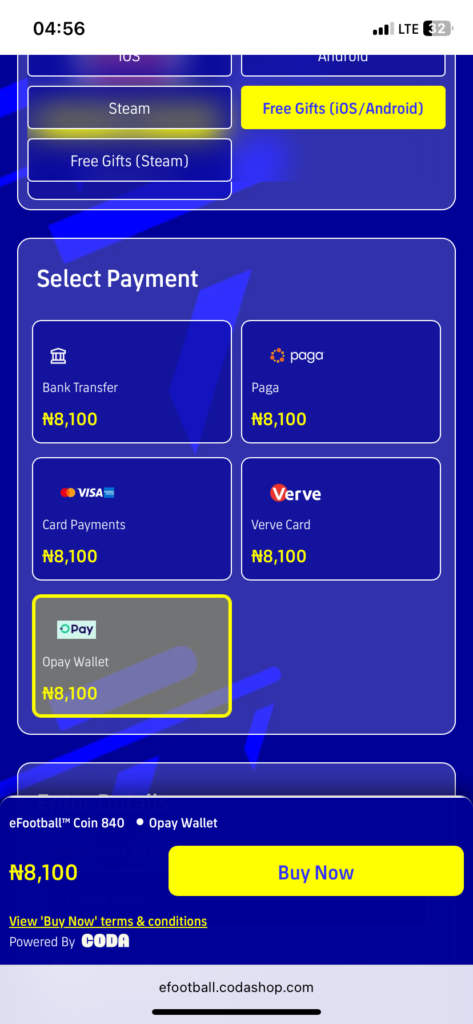
This is the part that makes everything smooth for Nigerian players.
- After selecting your coin package, scroll to the payment section.
- You will see a list of payment options.
- Look for “OPay Wallet” or “OPay.” Tap it.
The Nigeria store specifically lists OPay as a payment option alongside bank transfer, card payments, and Paga. OPay is the fastest and most reliable of the bunch.
7: Complete the OPay Payment
Once you select OPay, the checkout process begins.
- The page will redirect you to an OPay payment gateway or show an OPay QR code.
- If it is a QR code, open your OPay app.
- Tap the scan icon and scan the code on your screen.
- Confirm the amount shown in your OPay app.
- Enter your OPay PIN to authorize the payment.
- Wait for the confirmation.
If the page redirects to an OPay web payment instead of a QR code, just log in with your OPay phone number and PIN, then confirm the payment there.
The payment processes in seconds. You will see a success message on both the Codashop page and in your OPay transaction history.
8: Confirm Coin Delivery
After payment, your coins do not arrive instantly in the game. There is a short processing time.
- Stay on the Codashop page after payment.
- Look for an order confirmation or transaction ID.
- Take a screenshot of this. It is your proof of purchase.
- Open your eFootball game.
- Go to the in game store or your coin balance.
- Check if the coins have been added.
Most orders complete within a few minutes. If they do not show up after ten minutes, do not panic.
Video Walkthrough On How To Make The Payment With OPay
What to Do If Your EFootball Coins Do Not Arrive
This happens sometimes. Here is exactly how to fix it.
Wait ten minutes. The system needs time to process and sync with KONAMI servers. Do not buy again. You might get charged twice.
Check your KONAMI ID. Make sure you were logged into the correct account on Codashop. If you have multiple KONAMI IDs, you might have sent the coins to the wrong one.
Check your OPay transaction history. Confirm the payment actually went through and was not reversed.
Contact Codashop support. Scroll to the bottom of the Codashop page and click “Contact Us.” Submit a request with your order ID, KONAMI ID, and a screenshot of your OPay payment confirmation. They usually respond within 24 hours.
Do not contact KONAMI first. Payment issues are handled by Codashop, not KONAMI. Codashop is the merchant. They process the money. They fix delivery problems.
OPay vs Other Payment Methods on Codashop Nigeria
Codashop Nigeria offers several ways to pay. Here is why OPay wins.
| Feature | OPay Wallet | Bank Transfer | Card Payment | Paga |
|---|---|---|---|---|
| Speed | Instant | 1 to 5 minutes | Often declined | 2 to 10 minutes |
| Success Rate | Very High | High | Low for Nigerian cards | High |
| Fees | Very Low | Bank charges apply | International fees | Low |
| Ease of Use | Very Easy | Moderate | Frustrating | Easy |
| Refund Speed | Fast | Slow | Very Slow | Moderate |
Nigerian banks love to block gaming transactions. Cards get flagged for “suspicious international activity” even though Codashop is legitimate. OPay bypasses all of that because the payment stays within Nigeria and the system recognizes gaming merchants.
How Much Do eFootball Coins Cost in Nigeria?
Prices change with exchange rates and promotions, but here is a rough guide based on recent checks:
- 100 Coins: around ₦500 to ₦700
- 310 Coins: around ₦1,500 to ₦2,000
- 770 Coins: around ₦3,500 to ₦4,500
- 1,570 Coins: around ₦7,000 to ₦9,000
- 3,300 Coins: around ₦14,000 to ₦18,000
- 7,700 Coins: around ₦32,000 to ₦38,000
Always check the Codashop page for live prices. They update in real time.
Tips to Spend Your Coins Wisely
Coins are easy to burn. Here is how to make them last.
Wait for special signing campaigns. Konami runs events where specific players have higher drop rates. Save your coins for those.
Do not buy standard packs blindly. The odds of getting a top player from a regular pack are low. Focus on guaranteed signing campaigns or player selections where you know what you are getting.
Check the Match Pass. Sometimes buying the premium Match Pass with coins gives you more value than random packs. You get coins back, trainers, and guaranteed players.
Never buy coins from third party sellers. Only use Codashop or the in game store. Random sellers offering “cheap coins” are scams. They will steal your account or your money. Konami bans accounts that buy from unauthorized sources.
Frequently Asked Questions
Can I use OPay without the app?
No. You need the OPay app installed and verified to complete the payment on Codashop.
What if my OPay balance is not enough?
The transaction will fail. Fund your wallet first, then try again. Partial payments do not work.
Can I get a refund if I buy the wrong package?
Refunds are handled case by case by Codashop support. Contact them immediately with your order ID. Do not spend the coins if you want a refund.
Why is my card payment failing but OPay works?
Nigerian banks often flag gaming transactions as suspicious. OPay processes locally and recognizes Codashop as a legitimate merchant, so it goes through smoothly.
How long does delivery take?
Usually under five minutes. Rarely up to thirty minutes if KONAMI servers are slow.
Can I buy coins for a friend?
Yes, but you need to sign in with their KONAMI ID on Codashop. Be careful. Only do this for people you trust.
Is Codashop safe?
Yes. It is the official web store operated by Coda, a trusted partner of Konami. Your payment data is encrypted.
Conclusion
Thank you for reading to the end. I hope you have Learnt how you can buy eFootball coins in Nigeria using OPay. This guide has solved the long time issue of Dollar conversion to Naira before you buy coins.
Get your KONAMI ID ready. Fund your OPay wallet. Pick your package. Pay in Naira. Get your coins. It really is that simple now.
If this guide helped you get your coins without stress, drop a comment with what player you signed first. Let us know if OPay worked smoothly for you or if you hit any bumps.