

Are you searching for GTA Mzansi 5 Reborn on Android because you want something that feels closer to home than the streets of Los Santos? You are not alone. Every month, thousands of players look for a version of Grand Theft Auto that speaks their language, plays their music, and drives on roads they actually recognize. The good news is that this mod exists, it runs on most modern Android phones, and it is far more detailed than a simple texture swap.
This guide will walk you through exactly what GTA Mzansi 5 Reborn is, how it differs from the original game, and—most importantly—how to play it from the moment you tap the icon. We will cover the controls, the first missions, the township-specific features, and the technical fixes you need when something goes wrong. By the end, you will know whether this game belongs on your phone and how to get the most out of it.
Quick Facts: What You Need to Know First
| Detail | Information |
|---|---|
| Base Game | Grand Theft Auto: San Andreas (modded) |
| Platform | Android 6.0 and above |
| Total File Size | Approximately 1.5 GB (APK + OBB + Data) |
| RAM Required | 2 GB minimum; 4 GB recommended |
| Storage Needed | At least 3 GB free space before installation |
| Internet | Offline playable after installation |
| Play Store Availability | Not available; manual APK installation required |
| Developer | Community modders (not Rockstar Games) |
| Core Appeal | South African cities, culture, vehicles, and music |
If your phone has less than 2 GB of RAM, you will experience lag regardless of settings. If you have 4 GB or more, the game runs smoothly with HD textures enabled.
What Exactly Is GTA Mzansi 5 Reborn?
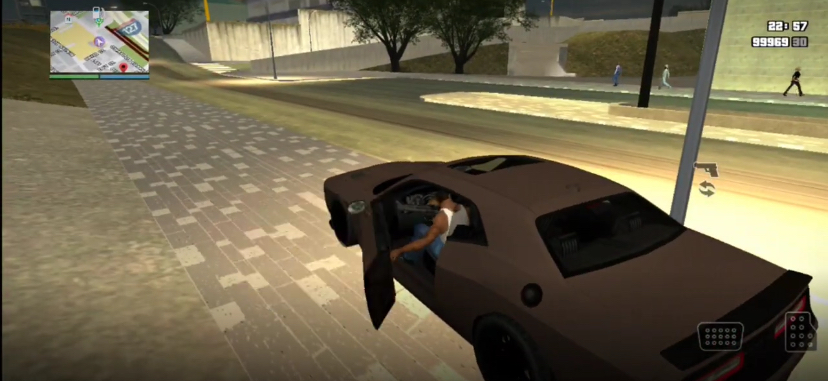
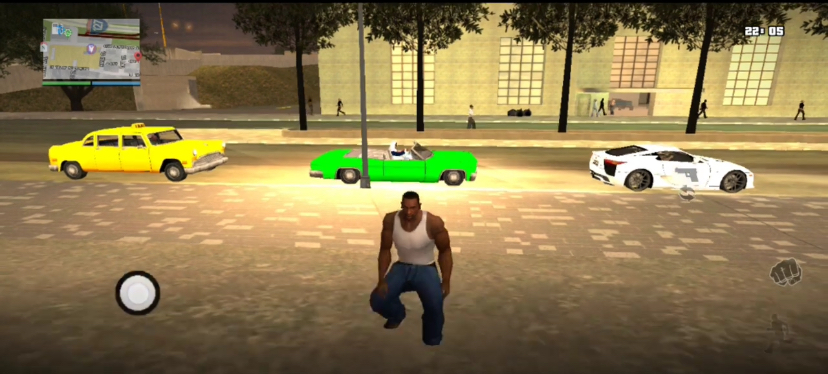
GTA Mzansi 5 Reborn is an unofficial, fan-made modification inspired by the Grand Theft Auto series that reimagines gameplay with a South African touch. The project is popular among players who enjoy open-world games and want to experience localized vehicles, environments, characters, and cultural references that reflect aspects of South African life.
Game Screenshots
Key Features Breakdown: What You Actually Get
Mzansi Map
You are not in Los Santos anymore. You are in South Africa. The map mixes real locations and Mzansi-flavored fictional areas. You will see townships with corrugated iron roofs. You will see CBDs with glass buildings. You will see highways that feel like the N1. You will see beaches that look like Durban. It is not 100% accurate, but the vibe is perfect.
Local Vehicles
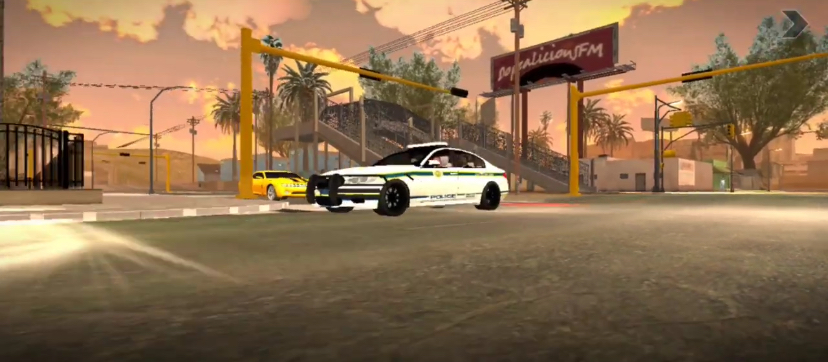
This is where the mod shines. The streets are full of cars that actually exist in South Africa.
- VW Golf GTIs everywhere.
- BMW 3 Series sedans.
- Minibus taxis with custom paint jobs.
- Police Nyalas and SAPS vans.
- Bakkies for off-road missions.
- Motorbikes weaving through traffic.
They drive differently too. Taxis are slow but tanky. BMWs drift like crazy. Bakkies climb hills that sedans cannot touch.
Character Models
Your character and the NPCs look local. The hairstyles are current. The fashion is township and suburban mixed. You will see school uniforms. You will see work overalls. You will see guys in All-Star sneakers and bucket hats. It feels like walking through a real taxi rank.
Radio and Music
The radio stations are pure Mzansi. You get Kwaito classics. You get Amapiano bangers. You get local Hip Hop. You get gospel stations. You get talk radio with South African accents. Driving while Amapiano drops is a vibe you cannot explain. You have to feel it.
Mzansi Slang and Voice Lines
NPCs do not shout generic American insults. They use South African English. They throw in vernac. You will hear “sharp sharp,” “yebo,” “now now,” and words in isiZulu and isiXhosa. It is not perfect, but it makes you smile every time.
New Missions
The Reborn version added missions that feel local. You do taxi wars. You do delivery runs for spaza shops. You do street races at night. You do heists that feel like they belong in Jozi, not Hollywood. The story is not Rockstar-level writing, but it is fun and it fits the setting.
Graphics Upgrade
Reborn brings better lighting. Sunset in this mod hits different. The shadows are softer. The water looks cleaner. The night scenes have that orange streetlight glow that every South African knows. It is still a mobile game, but it punches above its weight.
Custom HUD
Your phone interface in the game looks different. The map icons are styled for Mzansi. The menus have a local flavor. Even the loading screens show South African scenery.
Before You Play: Device Checklist
Do not just download and pray. Check this first.
- Android Version: You need at least Android 7.0. Anything lower will crash.
- RAM: 4GB minimum. 6GB or more is comfortable.
- Storage: You need at least 3GB free. The APK is small. The OBB file is huge.
- GPU: Adreno GPUs handle this mod best. Mali GPUs work but may drop frames in busy areas.
- Battery: This mod drains battery fast. Play near a charger or with power saving off.
- Cooling: Your phone will get warm. Remove your case if it overheats.
- Backup: Back up your phone before installing any large mod. If something breaks, you can restore.
First Boot: Main Menu Walkthrough
You tap the icon. The game loads. Here is exactly what happens and what to do.
The Splash Screen
You see the mod logo. Maybe a South African flag touch. Maybe a local landmark. Wait for it. Do not tap repeatedly. Let it load.
The Main Menu
You land on a screen with options:
- Story Mode
- Free Roam
- Settings
- Gallery
If this is your first time, tap Story Mode. Free Roam is fun later, but Story Mode teaches you the controls and the world.
Settings to Change Right Now
Before you play, tap Settings.
- Graphics: Set to Medium if your phone is average. Set to High only if you have a flagship.
- Frame Rate: Set to 30 FPS for stability. Only go higher if your phone is a beast.
- Language: Set to English. The mod does not have full vernac subtitles.
- Subtitles: Turn On. You will need them for mission dialogue.
- Control Layout: Pick the Standard layout first. You can customize later.
- Camera Sensitivity: Set to 70%. The default is too twitchy.
What NOT to Click Yet
Do not click Free Roam first. You will spawn with no weapons, no money, and no idea where you are. Story Mode gives you structure.
Android Controls: Touch Screen Guide
GTA on a phone is tricky. Here is every button and what it does.
Left Side of Screen
- Virtual Joystick: Slide your left thumb to move your character. Slide gently to walk. Slide hard to run. Double-tap forward to sprint.
Right Side of Screen
- Run Button: Hold it while moving to sprint. Drains stamina.
- Jump Button: Tap to climb fences or dodge.
- Punch Button: Tap to melee. Hold to block.
- Action Button: Context-sensitive. Tap to enter cars. Tap to talk to mission characters. Tap to buy food.
Driving Controls
When you enter a car, the buttons change.
- Accelerator: Bottom right. Hold to speed up.
- Brake: Next to accelerator. Hold to stop. Tap while turning to drift.
- Handbrake: Top right. Pull it to slide around corners.
- Horn: Tap to honk. Useful for taxi missions.
- Drive-by: Tap the weapon icon while driving to shoot.
Weapon Wheel
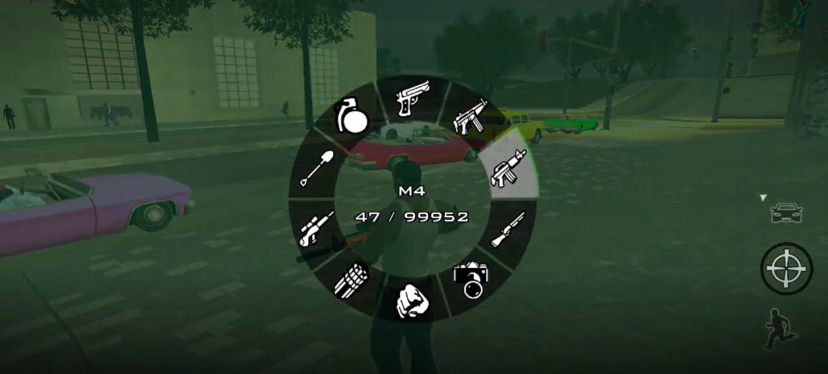
Tap the weapon icon on the top right. The game slows down. Swipe to pick your gun. Tap to confirm. You can also tap the fist icon to go unarmed.
Camera
Swipe anywhere on the right side of the screen to look around. Pinch with two fingers to zoom the map. Tap the mini-map to expand it.
Crouch and Cover
Tap the crouch button to go low. Approach a wall and tap action to stick to cover. Peek out by sliding the joystick sideways. Shoot by tapping the fire button.
Controller Support
If you have a Bluetooth gamepad, pair it. Go to Settings > Controls > Controller and map the buttons. A controller makes driving and shooting way easier. Touch controls work, but a gamepad makes you faster in combat.
How to Play: From Menu to Your First Mission
Let me walk you through your first hour like I am sitting next to you.
1: Start Story Mode
From the main menu, tap Story Mode. The game loads. You see a cutscene. You are introduced to your character. He is in a township. He needs money. He needs respect.
2: Follow the Yellow GPS Line
After the cutscene, you gain control. Look at the bottom left. You see a mini-map. You see a yellow blip. That is your objective. A yellow line shows you the route. Follow it.
3: Get in a Car
Walk up to any car. Tap the Action Button that appears on the right. Your character pulls the driver out and gets in. This is GTA. Stealing cars is the tutorial.
4: Drive to the Mission Blip
The GPS line leads you to a marker. Drive carefully at first. The touch steering is sensitive. Small swipes turn the wheel. Do not overcorrect. If you crash, get out and steal another car.
5: The First Combat Mission
You arrive. A cutscene plays. Now you have a gun. The game teaches you:
- Tap the target icon to lock onto an enemy.
- Tap the fire button to shoot.
- Tap the cover button near a wall to hide.
- Swipe the camera to aim manually if you prefer free aim.
Shoot the enemies. Do not stand in the open. Use cover. Move between walls. Let your health regenerate when it flashes low.
6: Complete the Mission
Kill all enemies or reach the escape vehicle. A mission passed screen appears. You earn money and respect.
7: Save Your Game
After the mission, you see a safehouse icon on the map. It looks like a house symbol. Drive there. Walk inside. Find the save icon — usually a floppy disk symbol on a bed or table. Tap action to save. Pick a slot. Save.
Why this matters: Android mods can crash. If you did not save, you lose everything.
Survival Guide: 10 Tips to Stay Alive in Mzansi GTA
You are not in Los Santos anymore. Mzansi has its own rules.
Respect the Taxis
Minibus taxis drive like they own the road. They cut you off. They stop suddenly. They swerve. Do not fight them. Let them pass. Or use them as cover during police chases. They are basically mobile walls.
Make Money Early
You start broke. Before big heists, do small jobs. Drive a taxi and pick up passengers. Do delivery runs. These build your bank without much risk.
Find the Weapon Shop
You need guns. Look for a gun icon on the map. Walk inside. Buy a pistol first. It is cheap. Later, buy an SMG for drive-bys. Save your money for armor too.
Understand the Wanted Level
One star: SAPS on foot. Just run. Two stars: Police cars chase you. Outdrive them. Three stars: Helicopters and roadblocks. Hide in alleys or change cars. Four stars and up: You are in deep trouble. Find a Pay n Spray or hide in a tunnel.
Mzansi police in this mod use roadblocks more than vanilla GTA. Watch for Nyalas parked across the road.
Eat to Heal
Your health does not regenerate fully in combat. You need food. Find a fast food spot or a spaza shop. Buy a kota or a bunny chow. It heals you. It is cheaper than hospital bills.
Tip 6: Customize Your Ride
Find a garage with a spray can icon. Drive inside. You can:
- Change paint color.
- Add nitrous for speed.
- Upgrade engine and brakes.
- Add bulletproof tires.
- Install a sound system (purely for vibes).
Your first car should be a VW Golf or a BMW. They are fast and common.
Know the Water
Some beaches are safe. Some have strong currents. If you swim too far, your stamina drops and you drown. Stick to shallow water unless you have a boat.
Avoid Gang Territories Early
Some areas on the map are red zones. Walk in there with no weapons and no armor, and you will get shot. Build up your strength and guns before claiming territory.
Save Before Everything
Before a mission. Before a heist. Before a street race. Before exploring a new area. Save. Android mods crash. Save files corrupt. Protect your progress.
Mzansi Culture Inside the Game
This mod is not just about shooting and driving. It is about feeling.
Locations That Feel Real
- Vilakazi Street vibes: A street that looks like Soweto. Tourists, street vendors, music.
- Durban beachfront: Palm trees, promenade, ice cream stands.
- Jozi CBD: Tall buildings, busy traffic, street hustlers.
- Township roads: Dust, potholes, informal houses, backyard shacks.
- Highways: The N1 feel. Long bridges, billboards, sunset drives.
Fashion
NPCs wear what people actually wear. School uniforms in the morning. Work boots at construction sites. All Stars and bucket hats at the taxi rank. It is small details that make you nod and say, “Yes, this is home.”
Language
The game mixes English with vernac. You will hear sentences like, “Hey wena, what are you doing?” or “Sharp sharp, my bru.” It is not full isiZulu or isiXhosa, but the flavor is there. Turn subtitles on so you do not miss jokes.
Music
The radio is the best part of any drive. Amapiano drops hit different when you are cruising through a township at night. Kwaito classics make you feel nostalgic. Local hip hop gives you energy before a mission.
Events
You can watch street soccer matches. You can stumble upon a street bash with people dancing. You can see taxi rank arguments. The world feels lived-in.
Vehicles Deep Dive: Drive Like a Local
Not all cars are equal in Mzansi. Here is what you need to know.
VW Golf GTI
- Speed: High
- Handling: Good
- Durability: Average
- Best For: Getaways and drifting
- Where to find: Everywhere. It is the most common car.
BMW 3 Series (Gusheshe)
- Speed: Very High
- Handling: Drifty
- Durability: Low
- Best For: Showing off and street races
- Where to find: Suburbs and CBDs
- Note: The “Gusheshe” drifts like crazy. Tap the handbrake and you will slide. Fun but dangerous for beginners.
Minibus Taxi
- Speed: Low
- Handling: Terrible
- Durability: Very High
- Best For: Smashing roadblocks and police cars
- Where to find: Taxi ranks and highways
Police Nyala
- Speed: Medium
- Handling: Heavy
- Durability: Extreme
- Best For: Surviving gunfights
- Where to find: Steal it from police stations or roadblocks
Bakkie (Pickup Truck)
- Speed: Medium
- Handling: Great off-road
- Durability: High
- Best For: Rural missions and hill climbing
- Where to find: Farms and construction sites
Motorbike
- Speed: Very High
- Handling: Wobbly
- Durability: Paper
- Best For: Weaving through traffic
- Warning: One crash and you fly off. Wear armor.
Weapons and Combat: How to Win Fights
You will fight a lot. Here is how to win.
Melee Weapons
- Knobkierie / Bottle: Silent kills. Good for early missions before you have guns.
- Brass Knuckles: Faster punches. Good for street fights.
Pistols
- Your starting weapon. Weak but fast. Headshots matter. Tap fire quickly.
SMGs
- Best for drive-bys. Hold the fire button while driving past enemies. Uzi-style guns spray fast.
Shotguns
- One-shot kills at close range. Best for clearing houses and alleys. Slow to fire, so make each shot count.
Rifles
- AK-style rifles are common. Good range. Good damage. Best for missions where you fight across streets.
Grenades and Molotovs
- Throw into groups. Molotovs set fires that block paths. Grenades bounce, so aim carefully.
Lock-On vs. Free Aim
- Lock-On: Tap the target button. The game aims for you. Best for touch screens.
- Free Aim: Swipe to aim manually. Harder but you can headshot faster.
- Tip: Use lock-on for moving targets. Use free aim for stationary enemies.
Side Hustles: Making Money Outside Missions
Missions pay, but side hustles build your empire.
Taxi Driving
Steal a taxi. Tap the mission trigger. Pick up passengers. Follow the GPS. Drop them off. You earn cash and tips. Do this ten times and you have enough for a decent gun.
Drug Runs
High risk. You pick up packages and deliver them to dealers. Police watch these routes. If you get caught, wanted level jumps fast. But the payout is big.
Street Racing
Find the street race icon at night. Bet on yourself. Win the race. Earn cash and respect. Use a BMW or a Golf. Do not use a taxi. You will lose.
Property
Once you have money, buy safehouses. They give you save points around the map. Buy businesses for passive income. They deposit money every in-game day.
Random Events
Help a stranger being robbed. Stop a carjacking. Return a stolen wallet. Small cash drops add up.
Comparison: GTA Mzansi Reborn vs. Official GTA V Mobile
I have played both. Here is the honest breakdown.
Official GTA V Mobile (via cloud or ports) looks better. The graphics are next-level. The story is a masterpiece. Online mode is endless. But it needs internet or a powerful device. It has no South African flavor. And it can feel stale if you have played it a hundred times.
GTA Mzansi Reborn does not look as sharp. The missions are simpler. The physics are older. But the vibe is unmatched. You hear your music. You see your streets. You drive your cars. It is fully offline. No microtransactions. No server queues. No internet needed.
If you want a cinematic blockbuster, play official GTA. If you want to feel at home while causing chaos, play Mzansi Reborn. Both can live on your phone.
Common Problems & Quick Fixes
| Problem | Fix |
|---|---|
| Game crashes on launch | Free up RAM. Close all background apps. Restart your phone. Make sure your Android version is 7.0 or higher. |
| Lag and frame drops | Go to Settings. Lower graphics to Low. Turn off shadows. Reduce draw distance. Disable anti-aliasing. |
| Touch controls not responding | Disable battery saver mode. It limits touch sensitivity. Also close apps running in the background. |
| Missing textures or purple buildings | The texture pack did not load. Check that all OBB files are in the correct folder. Reinstall if needed. |
| Sound cuts out or radio is silent | Check that your phone media volume is up. In game settings, set audio to Stereo, not Surround. |
| Save file lost or corrupt | Always back up saves manually. Do not force-close the game during a save. Wait for the save icon to disappear. |
| Car spawns inside buildings | This is a mod bug. Restart the mission. Or exit the car and re-enter. |
| Cannot enter some buildings | Not all buildings are enterable in this mod. Only marked safehouses and shops work. |
GAME HERE
Conclusion: Should You Play This?
Thank you for reading to the end. I must say that GTA Mzansi 5 Reborn actually feels good. I know the feelings that I get playing this game! Well, you too may decide to try it out. This mod was made by fans who love South Africa. And it shows.
Now tell me why do you love GTA Mzansi? Drop it in the comments.
Wow! I just played this game. It was kk
Oh, wow. I am glad that you enjoyed the game.
12345678
Does this file have a password
No, it has no password.