


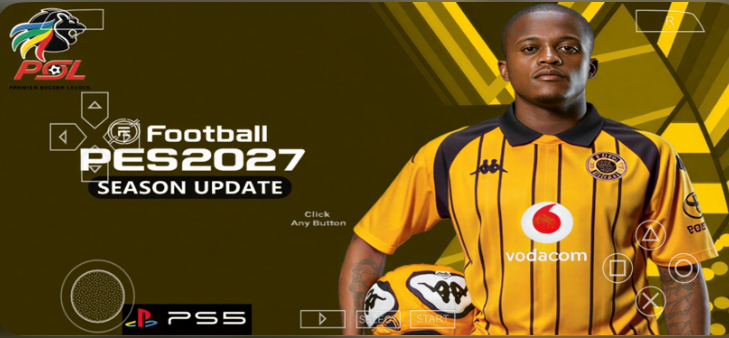
The eFootball PES 27 PPSSPP Mod is not just a texture swap. It is a full rebuild of the PSP classic with the Betway Premiership baked in, summer transfers updated, and gameplay that feels closer to modern eFootball than you would expect from a handheld that came out in 2004.
This guide is your one-stop shop. You will learn what this mod is, what is inside it, how to boot it up, how to navigate every menu, how to control your players, and — most importantly — how to actually win matches. No fluff. Just value.
Let us get into it.
Quick Facts Table
| Detail | Info |
|---|---|
| Base Game | Pro Evolution Soccer (PES) for PSP |
| Mod Name | eFootball PES 27 PPSSPP Mod |
| Star Feature | Betway Premiership (South African League) |
| Update Type | New Summer Update 2026 |
| Platform | PSP / PPSSPP Emulator (Android, iOS, PC) |
| Genre | Sports / Football Simulation |
| Offline Play | Yes — fully offline |
| Best For | Players who want deep football gameplay without internet |
GAMEPLAY
What Is This Mod? A Quick History
Konami stopped making PES for PSP a long time ago. But the community said, “Nah, we are not done.”
Modders took the old PES engine and kept pushing it. They added new kits, new faces, new stadiums, and new leagues. The eFootball PES 27 naming is the mod community’s way of saying, “This is our vision of what PES 2027 should feel like, but on PSP.”
The Betway Premiership addition is the big deal here. South African football is packed with passion, noise, and talent. Now you can take Orlando Pirates, Kaizer Chiefs, or Mamelodi Sundowns to continental glory — all on your phone or old PSP.
This summer update brings fresh transfers, new player faces, updated boots, and smoother gameplay physics. It feels like a new season, not a recycle.
Key Features Breakdown: What You Actually Get
Betway Premiership Full Integration
All the teams. Real kits. Real logos. Stadium atmosphere that feels alive. You are not playing with fake names and gray jerseys. You are playing with the actual league.
Summer 2026 Transfer Update
Players who moved in the real summer window? They are in the right clubs here. Squads feel current. Ratings got adjusted based on last season’s form.
New Faces and Hair
Star players look more like themselves. Some generic faces got replaced. It is not PS5 level, but for PSP? It is impressive.
Latest Kits, Boots, and Ad Boards
The modders did not sleep. New season jerseys, fresh boot colors, and pitch-side ad boards that match 2026 sponsors.
Gameplay Tweaks
Ball physics feel heavier and more realistic. AI defenders track runs better. Goalkeepers are less robotic. The speed of play sits in a sweet spot between arcade and simulation.
Clean Menu UI
The main menu got a polish pass. It looks modern. Navigation is faster. You spend less time clicking and more time playing.
Before You Boot Up: The Checklist
Do not skip this. A little prep saves you from crashes and rage.
- Device: PSP 1000/2000/3000/Go, or PPSSPP emulator on Android, iOS, or PC.
- Storage: Make sure you have free space. The mod is bigger than the original game because of all the new textures and audio.
- Base Game: You should own the original PES PSP game. Mods are built on top of existing files.
- PPSSPP Settings: If you are on emulator, set rendering mode to Vulkan or OpenGL. Turn on “Simulate Block Transfer” if faces or kits look weird.
- Save Data: Back up your old saves if you have any. Mods can overwrite or conflict with old data.
First Boot: Main Menu Walkthrough
You launch the game. The screen lights up. Here is exactly what you will see and what to do.
Step 1: The Boot Screen You see the Konami logo, then the mod splash screen. Press Start (or tap the screen if you mapped touch controls on PPSSPP).
Step 2: The Main Menu You land on a clean menu with options like:
- Exhibition
- Master League
- Become a Legend
- Cup
- League
- Edit
- System Settings
- Gallery
Step 3: What to Click First If you just want a quick match to feel the game, click Exhibition. If you want the long journey, click Master League.
Step 4: Settings to Change Right Now Before your first match, go to System Settings:
- Match Time: Set to 10 minutes. Five minutes is too short to enjoy the mod. Ten is the sweet spot.
- Difficulty: Start on Regular if you are new. The AI got smarter in this update.
- Camera: Use Dynamic Wide or Broadcast. It gives you the best view of through runs.
- Radar: Turn it On. You will need it for passing. Trust me.
What NOT to Click Yet Do not jump into Master League without checking your team first. You might pick a squad with no depth and lose your first three games. We will cover team picking later.
GAME SCREENSHOT
PSP Controls: Every Button Explained
If you are on PPSSPP, you can remap buttons. But here is the standard layout you should learn.
| Button | Attack (You Have Ball) | Defense (Opponent Has Ball) |
|---|---|---|
| D-Pad / Analog | Move player / Aim passes | Move player / Cursor switch |
| X (Cross) | Short pass | Pressure / Contains |
| Circle | Long pass / Cross | Sliding tackle |
| Triangle | Through pass | Goalkeeper rush |
| Square | Shoot | Standing tackle / Clearance |
| L Button | Sprint | Sprint |
| R Button | Special controls / Cancel actions | Cursor change |
| Select | Toggle radar / tactical view | Toggle radar |
| Start | Pause menu | Pause menu |
Hidden Moves You Need to Know
- Chip Shot: Hold L + press Square. Use this when the keeper rushes out.
- Manual Goalkeeper: Hold Triangle to pull your keeper out. Risky, but stops one-on-ones.
- Low Cross: Double tap Circle. Great for cutbacks.
- One-Two Pass: Press L + X to trigger a give-and-go. Your player passes and immediately runs forward.
How to Play: From Menu to Your First Goal
Let me walk you through your first match like I am sitting right next to you.
Step 1: Pick Your Mode
From the main menu, select Exhibition. This is the fastest way to play.
Step 2: Pick Your Team
You will see a team select screen. Use L and R to switch between league tabs. Scroll until you find the Betway Premiership tab. Pick Mamelodi Sundowns if you want a strong starter team. Pick Kaizer Chiefs if you want a challenge.
Step 3: Pick Opponent and Stadium
Pick any opponent. For stadium, choose FNB Stadium (Soccer City) if it is available. It looks incredible in this mod.
Step 4: Pre-Match Setup
You see a tactics screen. Do not panic. Use the D-pad to move between players. Press X to select a player and swap him with someone on the bench. For your first game, just press Start to skip this.
Step 5: Kickoff
The match begins. You control the player with the arrow under his feet. Pass with X. Sprint with L. Shoot with Square.
Step 6: The In-Game HUD
Look at the bottom of the screen. You see:
- Stamina bars: Small bars above player heads. Red means tired. Sub them out.
- Radar: The mini-map. Watch it to see open players.
- Scoreboard: Top corner. Shows time and score.
Step 7: Halftime
At 45 minutes, the whistle blows. You see a menu. You can make subs here. Press X on a tired player, then X again on his replacement.
Step 8: Full Time and Save
When the match ends, you see stats. Press X to continue. If the game asks you to save, press X again and choose a save slot.
Passing Mastery: 12 Pro Tips to Win More Matches
This is where you level up. Passing is not just about hitting X. Passing is how you control the game. Here are 12 tips that will change how you play.
Tip 1: One-Touch Pass and Through Passing Skills
Go to your squad screen before a match. Look at your midfielders. You want players who have One-Touch Pass and Through Passing skills. These players make cleaner passes. They do not stumble. They create chances out of nothing. If your favorite player does not have these skills, use skill cards to add them. Your midfielders need these the most.
Tip 2: Master the Timing of Through Passes
You see your striker making a run. You hit Triangle. He is offside. Or the defender gets it. Why?
Timing. You must press Triangle when your striker is almost ahead of the defender. Not too early. Not too late. Just as he is about to break the line. Watch his run. Wait for the gap. Then release.
Tip 3: Standard Through vs. Lofted Through
These are different. Standard through (just Triangle) is fast and rolls on the ground. Lofted through (hold L + Triangle) goes over the top.
Use standard through when the path is clear. Use lofted through when a defender is blocking the lane. The ball goes over his head and lands in your striker’s path.
Tip 4: The 30-Degree Curve Secret
This is the secret sauce. When you aim a through pass, do not point directly at your target. Point about 30 degrees outside of where you want the ball to go. The game adds a natural curve. The ball bends around the defender. It is harder to intercept. This works best with standard through passes.
Tip 5: Pass vs. Through — Know the Difference
Your player is running into open space. If you press X (short pass), he has to stop and control the ball. His momentum dies. That is bad.
If you press Triangle (through pass), he keeps running onto it. That is good.
Rule: If your player is running into space, use through. If he is standing still or tightly marked, use pass.
Tip 6: One-Two Pass to Break Defenses
Here is the classic move. Your winger has the ball. A defender is in front of him. Press L + X. He passes to a nearby teammate. The defender shifts to mark the teammate. Meanwhile, your winger sprints past. The teammate passes back. You are through.
Warning: Sometimes your player does not run. That means he is tired or low on stamina. Check his bar. Also, smart opponents will read it and intercept. But most of the time? It works.
Tip 7: Punish Players Who Press Too Much
Some opponents hold X and sprint at you all game. They leave gaps behind them. When you see a defender rushing at you, do not panic. Wait half a second. Let him commit. Then play a lofted through into the space he just left. He cannot stop and turn fast enough.
You can also bait them. Hold the ball. Stand still. Let them lose patience. As soon as they sprint, you through-pass into the gap.
Tip 8: GK Low Punt and the Radar
Your goalkeeper has a skill called GK Low Punt. If he does not have it, add it. Here is why.
When your keeper catches the ball, look at the radar (bottom of screen). Find a player with lots of empty space around him. Now press L + Circle (or the stunning pass button if mapped). Your keeper throws a laser pass to that player. Instant counterattack.
Tall players win these better than short players. Aim for your target man or fast winger.
Tip 9: Pass to Defend
A cross is coming into your box. Your instinct says press Square to clear. Stop. Do not do that.
Instead, press X to pass to your goalkeeper. Your defender will head it softly to the keeper. Safe possession. When you clear with Square, the ball goes anywhere. Usually straight back to the opponent. Pass, do not clear.
Tip 10: Crossing Timing
Crosses are deadly in this mod. But only if you time them right. You need your striker to be:
- Not too close to the goalkeeper
- In a position to head or volley
- Running toward the ball, not away from it
Press Circle when your winger is level with the edge of the box. If your striker is inside the six-yard box, it is too late. If he is at the penalty spot, that is the sweet spot.
If you love crossing, use tall strikers. They win headers.
Tip 11: Check Your Stats
After every match, look at your passing stats. If your successful pass rate is above 80%, you are elite. Below 60%? You are forcing it. Slow down. Keep the ball. Pass to feet, not into danger.
Tip 12: Stop Blind Passing
This is the biggest mistake. You are surrounded. You panic. You hit X in a random direction. Intercepted. Counterattack. Goal conceded.
If you do not see a safe pass, shield the ball. Hold L + R to protect it. Turn back. Pass to your defender. Keep possession. A pass you know will fail is worse than no pass at all.
Betway Premiership Mode: Your Guide to African Glory
This is the heart of the mod. The Betway Premiership is not just a skin. It plays differently.
Teams You Should Know
- Mamelodi Sundowns: Best squad. Deep bench. Fast attackers. Great for beginners.
- Orlando Pirates: Balanced. Good midfield. Fun to build around.
- Kaizer Chiefs: Passionate fanbase in real life. In-game, they have pace but lack depth. A challenge.
- SuperSport United: Solid defense. Good for learning to play counter-attacking football.
- Stellenbosch FC: Young squad. High potential players. Best for Master League.
How the League Works in Master League
Pick Master League from the main menu. Choose a Betway Premiership team. You start with a budget. You play 30 league games. Top teams qualify for the CAF Champions League. Bottom teams fight relegation.
The AI in this mod respects the league. Sundowns will dominate possession. Chiefs will press high. It feels authentic.
Hidden Gems
Look for young players with high speed and dribbling. The Betway Premiership in this mod has a few fictional prospects with crazy potential. Sign them cheap. Sell them for millions later.
Game Modes Explained
Exhibition
Quick match. Pick two teams. Pick a stadium. Play. Best for testing new tactics or just chilling.
Master League
The main event. You manage a club. You buy players. You handle finances. You play every match. The summer update refreshes this mode with new budgets and new free agents.
Become a Legend
You control one player. You start young. You earn your place in the starting eleven. You get called up to the national team. It is slow, but addictive if you love role-playing.
Cup Mode
Knockout tournaments. Single elimination. One bad game and you are out. High pressure. Great for short sessions.
League Mode
Play a full season without the management stuff. Just match after match. Pure football.
Advanced Tactics: Formations That Work
The PSP has limited buttons, so your formation matters more.
4-3-3 (The Default Goodness)
- 4 defenders
- 3 midfielders (one defensive, two box-to-box)
- 3 attackers (wingers + striker)
This gives you width. Use it if you love crossing and through balls down the flanks.
4-2-3-1 (Control the Middle)
- 4 defenders
- 2 defensive midfielders
- 3 attacking midfielders
- 1 striker
Best for passing teams. You dominate the center. Your striker gets fed by three creative players. Use this if you struggle to keep possession.
3-5-2 (All or Nothing)
- 3 defenders
- 5 midfielders
- 2 strikers
Risky. You get overrun on the wings. But if you love one-two passes and crowded midfields, this is fun.
In-Game Tactics
Press Up or Down on the D-pad during a match to switch between:
- Counter Attack: Drop back, then explode forward.
- Possession: Players come closer to receive passes.
- High Press: Defenders push up. Good when losing.
- Deep Defensive Line: Drop back and absorb pressure.
Comparison: This Mod vs. eFootball 2026 Mobile
I have played both. A lot. Here is the honest truth.
eFootball 2026 Mobile looks better. Obviously. It has real online modes. It has licensed stadiums. The graphics are console-level on a good phone. But it drains battery. It needs internet. The servers lag. And the monetization is everywhere. You feel pressured to spend.
The PES 27 PPSSPP Mod does not look as sharp. The faces are simpler. The grass is flat. But the gameplay? It is smoother than you think. The AI is smart. The Betway Premiership gives you something eFootball mobile does not — a fully offline, zero-lag, pure football experience. You can play on a plane. You can play with a Bluetooth controller. You can play for three hours and your phone still has battery.
If you want graphics and online ranked matches, play eFootball mobile. If you want deep career modes, zero ads, and the joy of South African football in your pocket, this mod wins.
Common Problems & Quick Fixes
| Problem | Fix |
|---|---|
| Black screen on boot | Your ISO is corrupted. Re-check your file. On PPSSPP, switch from Vulkan to OpenGL backend. |
| Game runs slow / lag | Turn off “Texture Scaling” in PPSSPP settings. Lower the rendering resolution to 1x or 2x. |
| Missing player faces or kits | You installed the base game but not the texture pack. Make sure all mod files are in the right folder. |
| Save data corrupt | Delete the old save. Start fresh. Mods often conflict with vanilla saves. |
| Audio cuts out | In PPSSPP, go to Audio settings and switch to “DirectSound” or increase audio latency. |
| Controls feel weird | Go to PPSSPP control mapping. Set up a transparent touch layout that matches your thumb reach. |
EFOOTBALL 27 BETWAY | GAME TEXTURE | Save Data | CAMERA PACK
Conclusion: Should You Play This?
Yes. If you love football games, yes.
This mod is not perfect. It is a PSP game at its core. But the love poured into it is real. The Betway Premiership feels alive. The passing mechanics reward skill. The Master League will eat your weekends. And you never have to watch a loading screen because of server maintenance.
If you are new to PPSSPP mods, this is the one to start with. If you are a veteran, the summer update gives you enough fresh content to fall in love again.
Pick your team. Set your formation. Master the through ball. And go win the league.
Now tell me — which Betway Premiership team are you taking to the title? Drop it in the comments.

It’s very interesting!