

GTA Mzansi online PPSSPP allows users to be online with friends, explore South African streets, and live the kasi life right from their Android phone. If you are tired of the same old Los Santos map and want something that feels fresh, cultural, and straight-up fun, this is the guide you need.
I have put in serious hours driving Citi Golfs through township streets, escaping police bakkies, and finding every hidden corner of this map. This guide is everything I wish I knew on day one. No fluff. Just clear steps, real tips, and honest talk.
Quick Info Table
| Detail | Info |
|---|---|
| Game Name | GTA Mzansi PPSSPP |
| Base Game | GTA: San Andreas (Mzansi Mod) |
| Platform | Android |
| File Size | Around 1.5GB to 2.8GB |
| Android Version | 7.0 and up |
| RAM Needed | At least 3GB for smooth play |
| Genre | Open World / Action-Adventure |
| Play Modes | Offline Story Mode + Online Multiplayer |
| Kasi Vibes | Maximum |
What Makes GTA Mzansi PPSSPP Different?
This is not just a reskin. The whole world speaks a different language.
You are not in America anymore. You are in Mzansi. The taxis are Quantum minivans with custom paint. The police drive bakkies. The radio hits different. The streets feel narrow, alive, and real.
Here is what stands out:
- Local Vehicles: VW Citi Golf, BMW 325is (Gusheshe), Toyota Quantum taxis, police bakkies, and more.
- Kasi Slang: NPCs and mission dialogue use South African street language.
- Map Vibe: Township streets, Johannesburg-style CBD, Cape Town-inspired coastlines, and local shops.
- Fashion: Characters wear tracksuits, bucket hats, and school uniforms that feel authentic.
- Soundtrack: Kwaito, amapiano, and local hip-hop replace the default radio stations.
Gameplay walkthrough
Key Features Breakdown
Open World Map
The map is pre-unlocked in most versions. You can go anywhere from the start. No waiting for bridges to open. Explore taxi ranks, downtown blocks, beachfronts, and hidden backroads.
Vehicle Customization
Take your Citi Golf or Gusheshe to a spray shop. Change the color. Add nitrous. Make it yours. Some cars drift better than others. The Citi Golf is light and perfect for tight township corners.
Weapons and Combat
You still have your classic GTA weapons, but the melee hits different. Fist fights feel rougher. Gun shops are marked on your radar. Watch your wanted level — township streets are narrow, so escaping police takes real skill.
Missions
Story missions follow a local narrative. Side missions include taxi runs, vigilante patrols, paramedic driving, and firefighter calls. The taxi missions are actually fun because you are driving real South African routes.
GTA Mzansi PPSSPP Screenshots
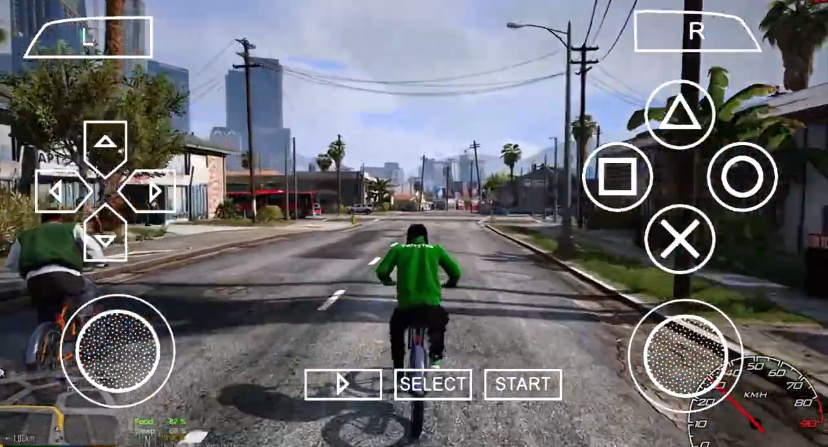
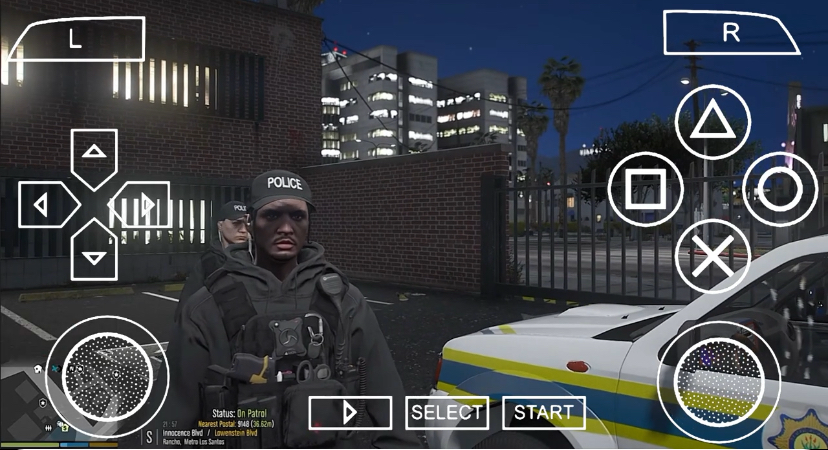
How to Play GTA Mzansi PPSSPP
This is where most guides fail. They tell you the game is cool but never show you how to actually play it. Let me fix that.
Step 1: Launching the Game
Open the game from your home screen. The first thing you see is the start screen with the logo and background music. Tap the screen or press Start.
Step 2: Main Menu
You will see four main options:
- New Game: Pick this if this is your first time playing. It starts the story from the beginning.
- Load Game: Pick this if you have a saved file and want to continue.
- Options: This is where you fix graphics, controls, and sound.
- Quit: Closes the game.
What to click: Tap New Game if you are starting fresh.
Step 3: First Cutscene and Spawn Point
The game starts with a short cutscene. Pay attention — it sets up the story. After that, you spawn near your first safehouse. A small text box appears telling you the controls. Read it. Do not skip it.
Step 4: Saving Your Game
Walk into the floppy disk icon inside your safehouse. This opens the save menu. Tap Save Game and pick a slot. Always save before starting a big mission. Always.
Step 5: Basic Controls on Android
The screen shows virtual buttons. Here is what each one does:
- Left Side: Virtual joystick. Drag it to walk or run.
- Right Side Buttons:
- Triangle: Enter or exit vehicles.
- Circle: Attack or shoot.
- Cross (X): Sprint (hold while moving).
- Square: Jump or handbrake in cars.
- L and R Triggers: Aim and shoot while holding a gun. Look around while driving.
Pro Tip: If the buttons feel too small, go to Options > Controls and make them bigger. Your thumbs will thank you.
Step 6: Starting Your First Mission
Look at the mini-map in the bottom corner. A colored marker shows where to go. Walk or drive to it. A cutscene starts. Follow the on-screen prompts.
Example: Mission 1 usually asks you to drive somewhere. Walk to a car. Tap Triangle to enter. Use the joystick to steer. Tap Cross to accelerate. Follow the pink blip on the radar.
Step 7: Using the Map and Radar
The radar is your best friend. It shows:
- Pink blips: Mission locations.
- Green houses: Safehouses you can buy or save at.
- Blue icons: Shops, gyms, or side missions.
- Red blips: Enemies.
Tap the pause button to open the full map. Zoom out to plan your route.
Step 8: Making Money Early
Before you chase the story, do this:
- Find a taxi. They are everywhere.
- Tap Triangle to enter.
- Tap R3 (the right joystick button) to start the taxi mission.
- Pick up passengers and drop them off. You earn cash fast.
- Save the money. Buy weapons and armor before hard missions.
Pro Tips to Play Like a Boss
Tip 1: Best Graphics Settings for Smooth Play
Go to Options > Display. Turn off frame effects. Set draw distance to medium. If your phone heats up, lower the resolution scale to 1x. The game still looks good and runs at 60 frames per second.
Tip 2: Never Lose Progress
Use multiple save slots. Save in Slot 1 before a mission. If you fail, load Slot 1. Do not overwrite your only save file during a mission.
Tip 3: Escape Wanted Levels in Townships
When you have two or more stars, drive into narrow alleyways. The police cars struggle to turn. Get out and hide behind a wall until the stars blink and disappear.
Tip 4: Find the Hidden Citi Golf
Near the first safehouse, check the parking lot behind the small shop. A silver Citi Golf spawns there most mornings. It is fast and drifts perfectly.
Tip 5: Gym Stats Matter
Visit the gym early. Build muscle and stamina. It makes fist fights easier and lets you sprint longer during chase missions.
GTA MZANSI Online: How the Multiplayer Works
GTA Mzansi online lets you link up with friends and cause chaos together. It is not a separate app. It is built into the same game.
Here is how it works:
- Make sure all players are on the same WiFi network.
- From the main menu, pick Multiplayer or Online Mode.
- One player hosts. Others join.
- You can free-roam together, race, or fight.
What works online:
- Free roam exploration.
- Car meetups and races.
- Co-op mission attempts.
What does not work:
- Story mission progression does not save for guests.
- Some cutscenes skip in multiplayer.
Pro Tip: Host the room on the phone with the strongest WiFi. If the host lags, everyone lags.
Best Settings for Smooth Gameplay
If the game stutters or the sound crackles, change these:
| Setting | What to Pick | Why |
|---|---|---|
| Rendering | Vulkan or OpenGL | Try both. Vulkan is faster on newer phones. |
| Frame Skip | Off or 1 | Only turn on if the game lags badly. |
| Texture Quality | Medium | High looks great but kills battery. |
| Audio Latency | Low | Stops sound delay during cutscenes. |
Battery Saver Tip: Play with your charger nearby. Open-world games drain fast. Lower screen brightness and close background apps before playing.
GTA Mzansi PPSSPP online Comparison with GTA San Andreas
I have played GTA San Andreas Mobile for years. I know every gang territory, and every hidden package. So how does GTA Mzansi PPSSPP compare?
GTA San Andreas Mobile is the classic. It is polished. The controls are tighter. The story is iconic. But after three playthroughs, it feels predictable. You know where every police bribe is. You know the fastest route from Grove Street to Las Venturas.
GTA Mzansi PPSSPP flips that boredom. The map is unfamiliar. The cars handle differently — township roads are tighter, so drifting matters more. The missions feel smaller but more personal. Instead of gang wars across a state, you are fighting for respect on one block.
San Andreas wins on polish and stability. Mzansi wins on freshness and culture. If you want a game that feels new every time you turn a corner, Mzansi is the move. If you want the safe, classic experience, stick with San Andreas.
My honest take? Play both. But if you have already 100-percented San Andreas twice, GTA Mzansi PPSSPP is the refresh you did not know you needed.
FAQ
Is this GTA Mzansi PPSSPP requires no internet ?
This version requires no internet, but for the online mode, internet is required.
Can I play it on iPhone?
No. This version is built for Android only.
What is the best phone to run it?
Any Android phone with 4GB RAM and a Snapdragon 600-series chip or better. Budget phones work if you lower the graphics.
GAME HERE
Conclusion
GTA Mzansi online PPSSPP is more than a mod. It is a whole new world built by people who love South African street culture. From the first time you hop into a Quantum taxi to the moment you outrun police through a township alley, it feels different. It feels alive.
This guide gave you the map. Now drive it. Save often. Explore everything. And if you find a hidden car spot I missed, drop it in the comments.
What is your favorite ride in GTA Mzansi? Let me know below.
Good game! Thank you Mzansi!!
You’re welcome. I am glad you like it
I want gta msazi
I want all